Samsung Refrigerator Temperature Settings
Get Samsung refrigerator temperature settings right. Recommended temps, how to set digital and dial models, Power Cool, and why temps drift.
Need appliance repair? Call now for same-day service.
Call +1 (888) 206-0056Your milk spoils too fast, or your ice cream turns to soup. The fix is often simple. Your Samsung refrigerator temperature settings may be wrong. This guide shows the right temperatures and how to set them on every Samsung model.
The Right Samsung Refrigerator Temperature Settings
Set the fridge between 37 and 40 degrees Fahrenheit. Set the freezer to 0 degrees. These numbers work for almost every Samsung model.
The FDA says to keep fridges at or below 40 degrees. Above 40, bacteria grow faster. Below 37, some foods start to freeze. The 37 to 40 range keeps food safe and fresh.
The freezer needs 0 degrees. At 0, food stays frozen solid. Above 0, ice cream softens and freezer burn speeds up. There is no reason to go below 0. Colder just wastes energy.
Write these numbers down. Fridge: 37 to 40. Freezer: 0. That is the whole rule.
How to Set Temperature on Digital Samsung Models
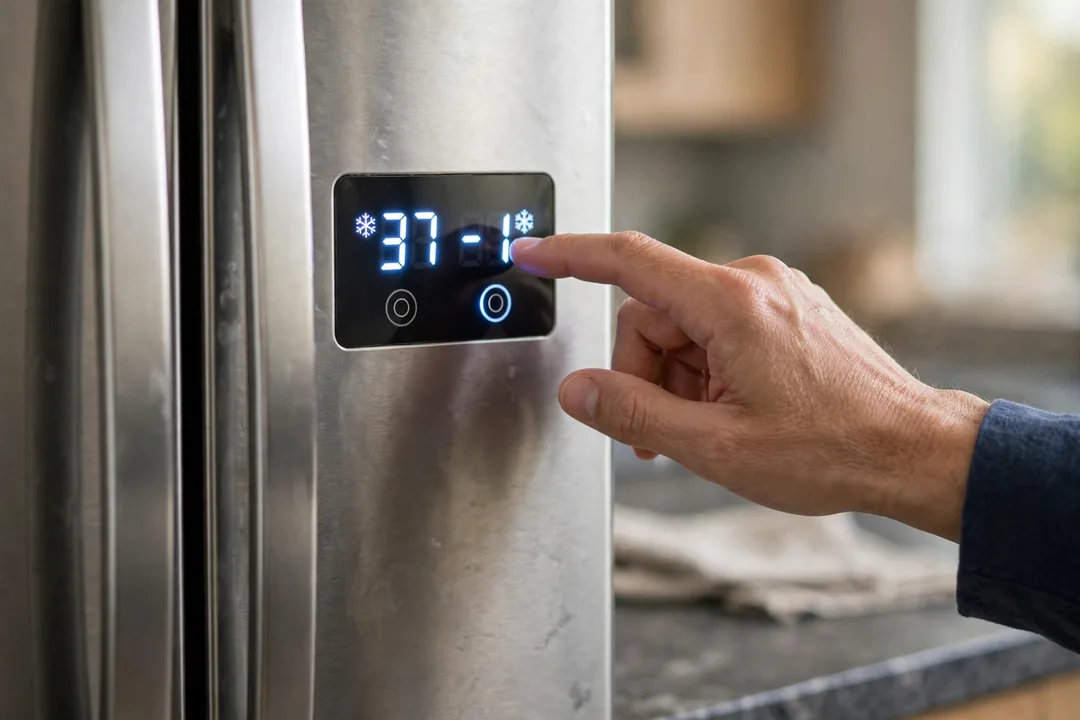
Most modern Samsung fridges have a digital display on the door. Changing the temperature takes seconds.
Press the Fridge button. Each press moves the set temperature. Keep pressing until you reach 37 to 40 degrees. Press the Freezer button the same way until it shows 0 degrees.
Some models use a touchscreen. Tap the temperature number. Use the plus and minus buttons to adjust. Tap OK or wait a few seconds to save.
The display shows the set temperature. It does not always show the actual temperature. After you change a setting, wait 24 hours. Then check with a fridge thermometer. The real temperature lags behind the setting.
How to Set Temperature on Family Hub Models
Family Hub fridges have a large screen on the door. Open the Fridge Manager app. Tap Temperature. Adjust the fridge and freezer sliders.
The app shows both set and current temperatures. This is handy. You can see how far the real temperature is from your setting.
Family Hub models also send phone alerts if the temperature rises too high. Check that alerts are turned on in the SmartThings app. A temperature alert can save a fridge full of groceries.
How to Set Temperature on Older Dial Models
Older Samsung fridges use a dial inside the fridge. The dial has numbers, not degrees. Higher numbers mean colder.
Start in the middle. Wait 24 hours. Check with a thermometer. Adjust one step colder or warmer. Wait another 24 hours. Repeat until the thermometer reads 37 to 40.
Dial models need patience. Each change takes a full day to settle. Do not crank the dial to max. That freezes food in the fridge section.
Power Cool and Power Freeze: When to Use Them
Power Cool drops the fridge temperature fast. Power Freeze does the same for the freezer. They run the compressor at full speed for a few hours.
Use them after a big grocery trip. Warm food raises the fridge temperature. Power Cool brings it back down fast. Use Power Freeze when you add a lot of unfrozen food to the freezer.
Both turn off by themselves after a few hours. Do not use them all the time. They use extra energy. For daily use, the normal settings are enough.
Why Temperatures Drift From Your Settings
You set 38 degrees. The thermometer reads 45. Something is fighting your settings.
Weak door seals are the top cause. Warm air leaks in around a bad gasket. Test it with the dollar bill trick. Close the door on a bill. If it slides out easily, the seal is weak.
Blocked vents are next. Cold air enters the fridge through vents, usually at the back. Food pushed against the vents blocks airflow. Leave space around the vents.
An overstuffed fridge cannot circulate air. A nearly empty fridge cannot hold temperature either. Keep it reasonably full. Water jugs work as thermal mass in an empty fridge.
Hot kitchens make the compressor work harder. Leave a few inches of space around the fridge. Do not push it tight against the wall. The coils need airflow.
If food freezes in the fridge section, our fridge freezing everything guide covers the causes. If the fridge is warm but the freezer works, see our fridge not cooling guide. Ice maker trouble often follows temperature problems, covered in our ice maker not making ice guide.
When Temperature Problems Mean a Repair
Settings fix most temperature complaints. But some need a technician.
The fridge never reaches the set temperature, no matter what you try. The temperature swings wildly day to day. Frost builds up heavily in the freezer. The compressor runs nonstop but the fridge stays warm.
These signs point to a bad thermostat, a failing compressor, a refrigerant leak, or blocked coils. Our refrigerator repair hub covers all of these.
Do not ignore a fridge that cannot hold 40 degrees. Food above 40 for more than 2 hours is not safe. When in doubt, throw it out.
Quick Temperature Checklist
Set fridge to 37 to 40, freezer to 0. Wait 24 hours after changes. Verify with a thermometer, not just the display. Keep vents clear and seals tight. Use Power Cool only after grocery trips.
Common Samsung Temperature Setting Mistakes
Setting the fridge to the coldest option is the top mistake. It freezes lettuce and milk. It also wastes energy. Stick to 37 to 40 degrees.
Changing settings too often is another. Every change needs 24 hours to settle. Adjusting twice a day means the fridge never stabilizes. Make one change. Wait a full day. Then check.
Trusting the display alone misleads people. The display shows your setting. It does not show the real temperature inside. A ten dollar fridge thermometer tells the truth. Keep one on the middle shelf.
Blocking the temperature sensor causes false readings. Samsung fridges have a sensor inside, usually near the top. Do not stack food against it. Blocked sensors make the fridge run too cold or too warm.
Fridge still will not hold temperature? Call us at +1 (888) 206-0056. Our refrigerator repair team diagnoses cooling problems every day. Find a technician near you on our locations page.
Frequently Asked Questions
What temperature should my Samsung refrigerator be set to?
Set the fridge to 37 to 40 degrees Fahrenheit. Set the freezer to 0 degrees. These are the recommended settings for food safety and freshness. The FDA says keep the fridge at or below 40 degrees. Your Samsung display may show the set temperature, not the actual one. Check with a thermometer.
How do I change the temperature on my Samsung fridge?
On digital models, press the Fridge button repeatedly until you reach the temperature you want. Press Freezer for the freezer setting. On Family Hub models, tap the Fridge Manager app. On older dial models, turn the dial toward colder. Wait 24 hours after any change for temperatures to settle.
What is Power Cool on a Samsung refrigerator?
Power Cool drops the fridge temperature fast for a short time. Use it after loading warm groceries. It runs the compressor harder for a few hours, then turns off by itself. Power Freeze does the same for the freezer. Do not leave these on all the time. They use extra energy.
Why is my Samsung fridge temperature flashing?
A flashing temperature means the fridge is too warm. It often happens after a power outage or when the door was left open. It can also mean the fridge is still cooling down after a setting change. If it keeps flashing for more than a day, check the door seals and vents for problems.
Why does my Samsung fridge keep changing temperature on its own?
The fridge adjusts itself as doors open and close. Hot weather and frequent opening make the compressor work harder. Blocked vents and weak door seals cause bigger swings. If the set temperature keeps resetting, the control board may have a fault. Try a power reset by unplugging for 5 minutes.
Should the fridge and freezer settings match in summer?
No, keep the standard settings year round. The fridge still wants 37 to 40 degrees and the freezer still wants 0. The compressor simply runs longer in hot weather. Do not set colder temperatures to compensate for summer heat. That wastes energy without helping. Make sure the fridge has breathing room around it instead.
Broken appliance? We're one call away.
Same-day appliance repair across 40 cities. Upfront pricing, written warranty, and an honest repair-or-replace answer on every job.
Call +1 (888) 206-0056